Permanently and securely erase all data from hard drives and SSDs using industry-standard wiping methods. Boot any computer over the network, wipe its drives, and receive a verifiable certificate of destruction for compliance and audit purposes.
A simple 4-step process to securely destroy data on any computer
Download our bootable ISO or USB image below. Write it to a USB drive or burn it to a CD/DVD. This creates a portable tool you can use on any computer.
Insert the USB/CD into the target computer and boot from it. You may need to press F12, F2, or Del during startup to access the boot menu and select your media.
Choose your preferred data destruction method from the menu. Options range from quick single-pass erasure to DoD 7-pass or Gutmann 35-pass for maximum security.
Once complete, you'll receive a certificate of destruction with a unique verification code. This can be verified online for audit and compliance documentation.
Choose the format that works best for your needs. All options contain the same software.
sudo dd if=ipxe.usb of=/dev/sdX bs=4M status=progresslsblk to find it). This will erase the USB drive.
Choose the appropriate method based on your security requirements and available time
Writes zeros to the entire drive once. Fast but provides basic security. Suitable for non-sensitive data or when time is critical.
US Department of Defense standard. Writes patterns of zeros, ones, and random data. Widely accepted for compliance requirements.
Enhanced version with 7 passes for highly sensitive data. Exceeds standard DoD requirements. Used by government and defense contractors.
Peter Gutmann's 35-pass method designed for older magnetic media. Maximum theoretical security but very time-consuming.
For most business and personal use, DoD 5220.22-M (3-pass) provides excellent security and is widely accepted for compliance. It balances thoroughness with reasonable completion time. Quick Erase is fine for non-sensitive equipment being recycled internally. The 7-pass and 35-pass methods are primarily for organizations with specific regulatory requirements or handling classified data.
Verifiable proof of secure data destruction for compliance and audit purposes
Each certificate includes:
After a successful wipe, you'll receive a verification code displayed on screen. Create an account and verify your certificate to download an official PDF:
Verify CertificateEnter your verification code and device serial number to authenticate and download your official Certificate of Data Destruction.
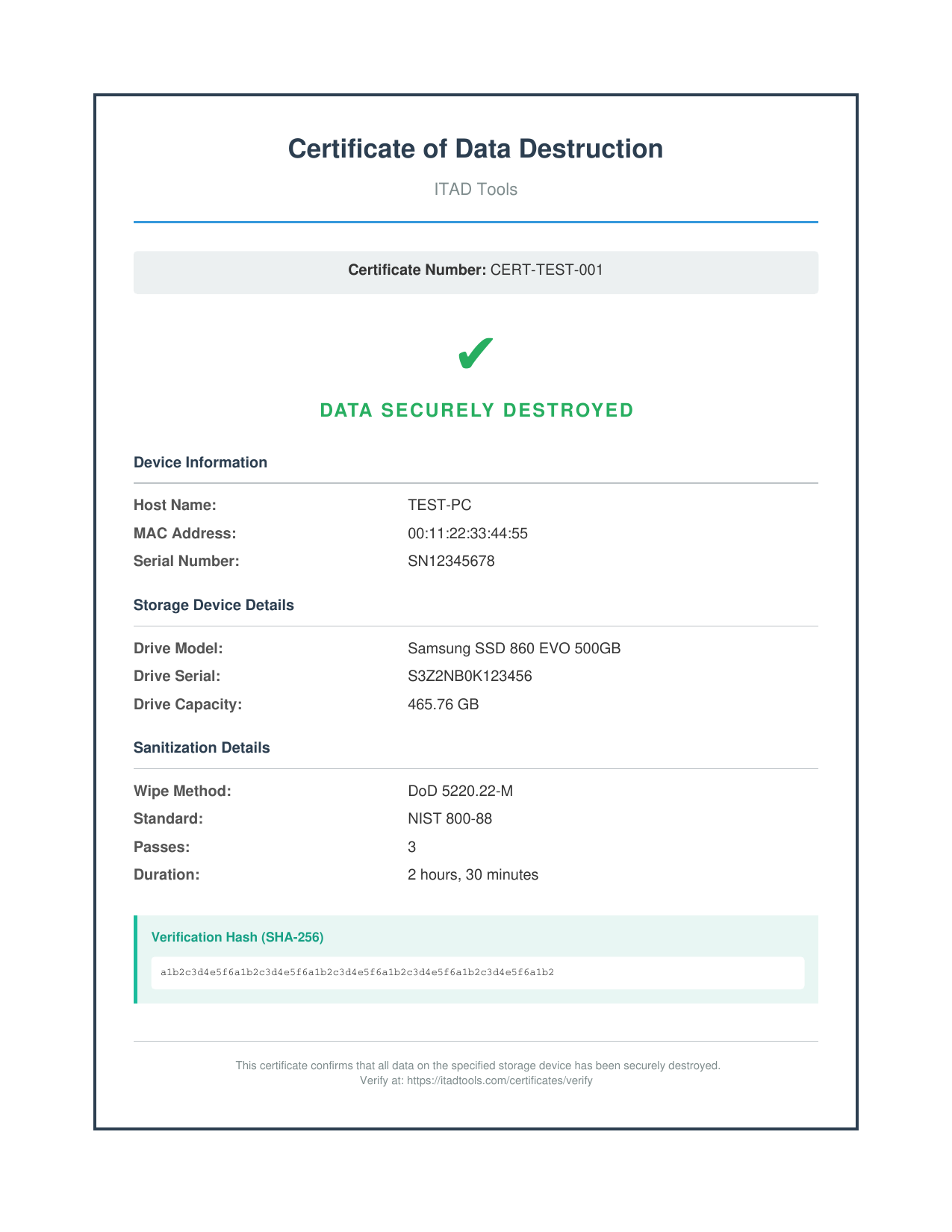
Sample Certificate of Data Destruction
For IT professionals with existing PXE infrastructure
If you already have an iPXE environment or want to chain-load from your existing PXE server, use this command to access the ITAD Tools boot menu:
Secure by default: Our boot images include full HTTPS/TLS support. All communication with itadtools.com is encrypted. The target computer will securely connect to register the device, download the wipe environment, and report completion status.
HTTP fallback: If your iPXE build doesn't support HTTPS, you can use:
chain http://itadtools.com/pxe/boot.ipxe
Once a wipe begins, the data cannot be recovered. This process is designed to be irreversible. Before proceeding, ensure you have:
Yes. The software works on both traditional hard drives (HDDs) and solid-state drives (SSDs). For SSDs, the wipe overwrites all accessible sectors. Note that some SSD controllers may have reserved areas that standard wipe methods cannot reach - for maximum SSD security, consider using the drive manufacturer's secure erase utility in addition to our software.
It depends on the drive size and wipe method. A quick single-pass wipe of a 500GB drive typically takes 1-2 hours. A 3-pass DoD wipe takes 3-6 hours. The 35-pass Gutmann method can take 24+ hours for large drives. SSDs are generally faster than HDDs.
Yes. The boot media connects to itadtools.com to download the wipe environment and report results. This enables certificate generation and verification. The computer needs a working Ethernet connection (WiFi is not supported in the boot environment).
The software will detect and wipe all internal drives in the system. You'll see a list of detected drives before the wipe begins. All drives are wiped using the same method you select.
Our DoD 5220.22-M wipe method meets or exceeds the data sanitization requirements of most regulatory frameworks including HIPAA, GDPR, PCI-DSS, and SOX. The generated certificates provide documentation for compliance audits. Always verify specific requirements with your compliance officer.
If power is lost or the process is interrupted, the wipe will be incomplete and the data may be partially recoverable. No certificate will be issued. You'll need to restart the wipe process from the beginning. We recommend using a UPS for critical wipes.